C++利用cout简单输出
如何空格输出
#include<iostream> using namespace std; int main() { cout<<"hello world"; return 0; }前面演示的hello world的输出中间部分就带有一个空格(hello world中间有多少空格就输出多少空格)
2. 如何换行输出
#include<iostream> using namespace std; int main() { cout<<"hello"; cout<<endl; cout<<"world"; return 0; }效果如下:
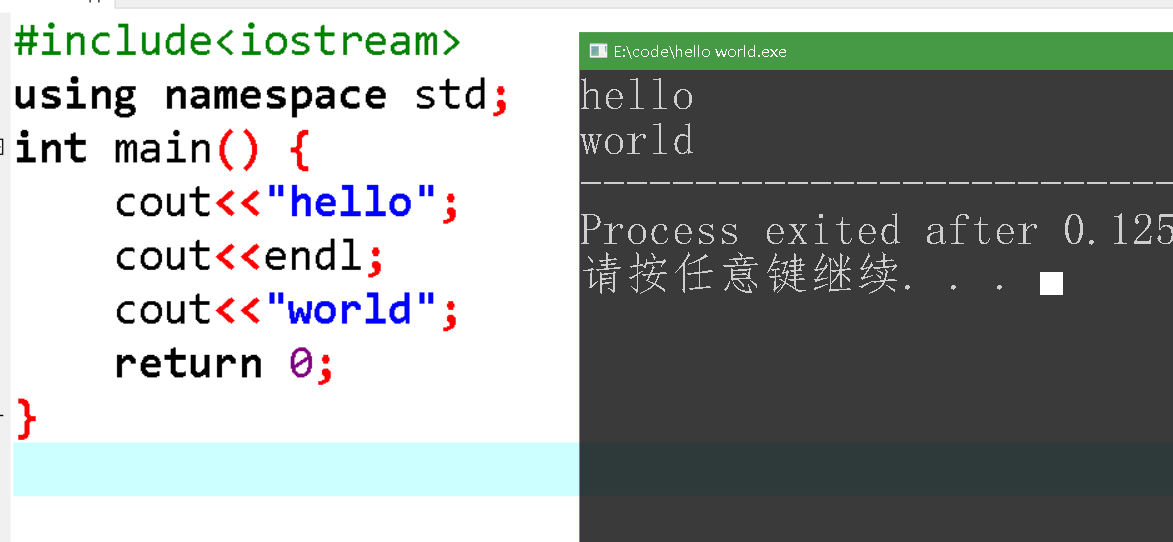
上面的代码也可以连起来写,效果一样:
#include<iostream> using namespace std; int main() { cout<<"hello"<<endl<<"world"; return 0; }最后写一篇古诗:
#include<iostream> using namespace std; int main() { cout<<"两个黄鹂鸣翠柳,"<<endl; cout<<"一行白鹭上青天。"<<endl; cout<<"窗含西岭千秋雪,"<<endl; cout<<"门泊东吴万里船。"<<endl; return 0; }.jztagtree{max-height:85vh;right:0px}.jzDown{top:10vh}.jztagtree li a{background-color:#448EF6}.jztagtree li a:before{border-right:10px solid #448EF6}.jztagtree li a:hover{background:#0045a6}.jztagtree li a:hover::before{border-right:10px solid #0045a6}
$("#jztoc").toc({content: ".single", headings: "h1,h2,h3"});