图的访问与存储—临接表
一、基本结构
二、临接表示例
1.无向图的邻接表
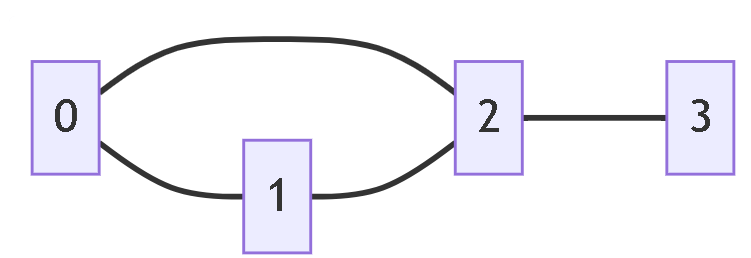
如果上面的图用临接矩阵表示,那么便是一个4*4的矩阵
| 顶点 | 0 | 1 | 2 | 3 |
|---|---|---|---|---|
| 0 | 0 | 1 | 1 | 0 |
| 1 | 1 | 0 | 1 | 0 |
| 2 | 1 | 1 | 0 | 1 |
| 3 | 0 | 0 | 1 | 0 |
如果是临接表,那么可以看出一共有4个顶点0、1、2、3
每个顶点都有“邻居”(邻居数组)。
比如顶点0,它的邻居数组是[1,2]
顶点1,它的邻居数组是[0,2]
顶点2,它的邻居数组是[0,1,3]
顶点3,它的邻居数组是[2]
表示成下面这样:
0 → [1, 2]
1 → [0, 2]
2 → [0, 1, 3]
3 → [2]
参考代码:
#include <iostream>
#include <vector>
using namespace std;
// 创建无向图的邻接表
vector<vector<int> > createUndirectedGraph(int numVertices) {
    return vector<vector<int> >(numVertices);
}
// 添加无向边
void addUndirectedEdge(vector<vector<int> >& graph, int u, int v) {
    graph[u].push_back(v);
    graph[v].push_back(u);
}
// 打印邻接表
void printGraph(const vector<vector<int> >& graph) {
    cout << "无向图邻接表:" << endl;
    for (int i = 0; i < graph.size(); i++) {
        cout << "顶点 " << i << " -> ";
        // 循环遍历邻居
        for (int j = 0; j < graph[i].size(); j++) {
            cout << graph[i][j] << " ";
        }
        cout << endl;
    }
}

// 计算每个顶点的度
vector<int> calculateDegrees(const vector<vector<int> >& graph) {
    vector<int> degrees(graph.size(), 0);
    for (int i = 0; i < graph.size(); i++) {
        degrees[i] = graph[i].size();
    }
    return degrees;
}

// 检查两个顶点之间是否有边 - 使用传统for循环
bool hasEdge(const vector<vector<int> >& graph, int u, int v) {
    for (int j = 0; j < graph[u].size(); j++) {
        if (graph[u][j] == v) {
            return true;
        }
    }
    return false;
}
// 删除无向边
void removeUndirectedEdge(vector<vector<int> >& graph, int u, int v) {
    // 删除 u->v 的边
    for (int j = 0; j < graph[u].size(); j++) {
        if (graph[u][j] == v) {
            graph[u].erase(graph[u].begin() + j);
            break;
        }
    }

    // 删除 v->u 的边
    for (int j = 0; j < graph[v].size(); j++) {
        if (graph[v][j] == u) {
            graph[v].erase(graph[v].begin() + j);
            break;
        }
    }
}
int main() {
    // 创建无向图
    vector<vector<int> > graph = createUndirectedGraph(6);
    // 添加边
    addUndirectedEdge(graph, 0, 1);
    addUndirectedEdge(graph, 0, 2);
    addUndirectedEdge(graph, 1, 3);
    addUndirectedEdge(graph, 1, 4);
    addUndirectedEdge(graph, 2, 4);
    addUndirectedEdge(graph, 3, 5);
    // 打印图
    printGraph(graph);
    cout << endl;
    // 计算顶点度
    vector<int> degrees = calculateDegrees(graph);
    for (int i = 0; i < degrees.size(); i++) {
        cout << "顶点 " << i << " 的度: " << degrees[i] << endl;
    }
    cout << endl;
    // 检查边
    cout << "检查边 0-1: " << (hasEdge(graph, 0, 1) ? "存在" : "不存在") << endl;
    cout << "检查边 0-3: " << (hasEdge(graph, 0, 3) ? "存在" : "不存在") << endl;
    cout << endl;
    // 删除边
    cout << "删除边 0-1 后:" << endl;
    removeUndirectedEdge(graph, 0, 1);
    printGraph(graph);
    return 0;
}
2.有向图的临接表
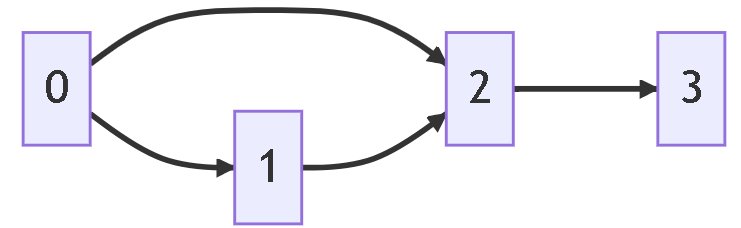
对于上面这个有向图,如果用临接矩阵表示,是一个4*4的临接矩阵,如下所示
| 顶点 | 0 | 1 | 2 | 3 |
|---|---|---|---|---|
| 0 | 0 | 1 | 1 | 0 |
| 1 | 0 | 0 | 1 | 0 |
| 2 | 0 | 0 | 0 | 1 |
| 3 | 0 | 0 | 0 | 0 |
如果是临接表,那么有4个顶点0,1,2,3
对于顶点0来说,它的邻居数组是[1,2]
对于顶点1来说,它的邻居数组是[2]
对于顶点2来说,它的邻居数组是[3]
对于顶点3来说,它的邻居数组是[]
表示成下面
顶点0: [1, 2]  // 0指向1、2
顶点1: [2]     // 1指向2
顶点2: [3]     // 2指向3
顶点3: []      // 3无出边
参考代码
#include <iostream>
#include <vector>
using namespace std;
// 创建有向图的邻接表
vector<vector<int> > createDirectedGraph(int numVertices) {
    return vector<vector<int> >(numVertices);
}
// 添加有向边
void addDirectedEdge(vector<vector<int> >& graph, int from, int to) {
    graph[from].push_back(to);
}
// 打印邻接表
void printGraph(const vector<vector<int> >& graph) {
    cout << "有向图邻接表:" << endl;
    for (int i = 0; i < graph.size(); i++) {
        cout << "顶点 " << i << " -> ";
        // for循环遍历出边
        for (int j = 0; j < graph[i].size(); j++) {
            cout << graph[i][j] << " ";
        }
        cout << endl;
    }
}

// 计算每个顶点的出度
vector<int> calculateOutDegrees(const vector<vector<int> >& graph) {
    vector<int> outDegrees(graph.size(), 0);
    for (int i = 0; i < graph.size(); i++) {
        outDegrees[i] = graph[i].size();
    }
    return outDegrees;
}

// 计算每个顶点的入度
vector<int> calculateInDegrees(const vector<vector<int> >& graph) {
    vector<int> inDegrees(graph.size(), 0);
    for (int i = 0; i < graph.size(); i++) {
        for (int j = 0; j < graph[i].size(); j++) {
            int target = graph[i][j];
            inDegrees[target]++;
        }
    }
    return inDegrees;
}

// 检查是否有从u到v的有向边 - 使用传统for循环
bool hasDirectedEdge(const vector<vector<int> >& graph, int from, int to) {
    for (int j = 0; j < graph[from].size(); j++) {
        if (graph[from][j] == to) {
            return true;
        }
    }
    return false;
}

// 删除有向边 - 使用传统for循环
void removeDirectedEdge(vector<vector<int> >& graph, int from, int to) {
    for (int j = 0; j < graph[from].size(); j++) {
        if (graph[from][j] == to) {
            graph[from].erase(graph[from].begin() + j);
            break;
        }
    }
}


int main() {
    // 创建有向图
    vector<vector<int> > graph = createDirectedGraph(6);

    // 添加有向边
    addDirectedEdge(graph, 0, 1);
    addDirectedEdge(graph, 0, 2);
    addDirectedEdge(graph, 1, 3);
    addDirectedEdge(graph, 2, 1);
    addDirectedEdge(graph, 2, 4);
    addDirectedEdge(graph, 3, 5);
    addDirectedEdge(graph, 4, 3);
    addDirectedEdge(graph, 4, 5);

    // 打印图
    printGraph(graph);
    cout << endl;

    // 计算出度和入度
    vector<int> outDegrees = calculateOutDegrees(graph);
    vector<int> inDegrees = calculateInDegrees(graph);

    for (int i = 0; i < graph.size(); i++) {
        cout << "顶点 " << i << " - 出度: " << outDegrees[i]
             << ", 入度: " << inDegrees[i] << endl;
    }
    cout << endl;

    // 检查有向边
    cout << "检查边 0->1: " << (hasDirectedEdge(graph, 0, 1) ? "存在" : "不存在") << endl;
    cout << "检查边 1->0: " << (hasDirectedEdge(graph, 1, 0) ? "存在" : "不存在") << endl;
    cout << "检查边 2->4: " << (hasDirectedEdge(graph, 2, 4) ? "存在" : "不存在") << endl;
    cout << endl;
    // 删除边
    cout << "删除边 0->2 后:" << endl;
    removeDirectedEdge(graph, 0, 2);
    printGraph(graph);

    return 0;
}
3.带权图的邻接表
邻接表需存储 “邻居顶点 + 权重”(通常用二元组 / 结构体):
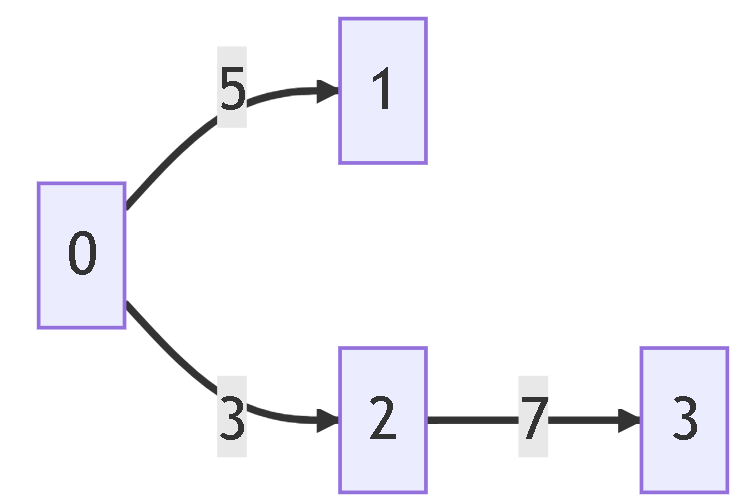
对于这个带权图,如果是临接矩阵,那么是4*4的临接矩阵,表示成下面这样
| 顶点 | 0 | 1 | 2 | 3 |
|---|---|---|---|---|
| 0 | 0 | 5 | 3 | 0 |
| 1 | 0 | 0 | 0 | 0 |
| 2 | 0 | 0 | 0 | 7 |
| 3 | 0 | 0 | 0 | 0 |
如果是临接表进行表示,
顶点0: [(1,5), (2,3)]
顶点1: []
顶点2: [(3,7)]
顶点3: []
带有权重的图可以使用pair来表示
适用于有向、带权重的场景(如路径长度、费用),用 pair<int, int> 存储「邻居顶点 + 权重」(第一个元素 = 邻居,第二个 = 权重)。
参考答案:
#include <iostream>
#include <vector>
#include <utility>
using namespace std;
//添加带权边
void addEdgeToGraph(vector<vector<pair<int, int>>>& adj, int u, int v, int weight) {
    adj[u].push_back(pair<int, int>(v, weight));
}
//打印
void printGraph(vector<vector<pair<int, int>>>& adj) {
    for (int i = 0; i < adj.size(); ++i) {
        cout << "顶点 " << i << " 指向:";
        vector<pair<int, int>> edges = adj[i];
        for (int j = 0; j < edges.size(); ++j) {
            int neighbor = edges[j].first;
            int weight = edges[j].second;
            cout << "(" << neighbor << ", 权重" << weight << ") ";
        }
        cout << endl;
    }
}
int main() {
    // 4个顶点 二维向量
    vector<vector<pair<int, int>>> graphAdj(4);
    // 添加边(此时graphAdj已有0-3共4个顶点,访问合法)
    addEdgeToGraph(graphAdj, 0, 1, 13); //加入边和权重
    addEdgeToGraph(graphAdj, 0, 2, 14);
    addEdgeToGraph(graphAdj, 1, 2, 15);
    addEdgeToGraph(graphAdj, 2, 3, 16);
    addEdgeToGraph(graphAdj, 3, 1, 17);
    cout << "=== 有向带权图===" << endl;
    printGraph(graphAdj);
    cout << endl;
    return 0;
}
扫描二维码推送至手机访问。
版权声明:本文由青少年编程知识记录发布,如需转载请注明出处。