DEVC++如何支持C++11
DEVC++默认开启C++11,需要手动添加C++11支持。
DEVC++需要使用高一点的版本,
DEVC++5.11下载地址:
(1) 官方下载地址: Dev-C++ download | SourceForge.net
(2) 网盘下载地址:
(访问密码: 7381)
https://url47.ctfile.com/f/64055047-8504055040-c524b3?p=7381
我们打开DevC++,新建一个C++代码,
#include <iostream> using namespace std; int main() { auto x = 42; // C++11 的 auto 类型推导 cout << x << std::endl; return 0; }这个代码在不支持C++11的编译器中会报错
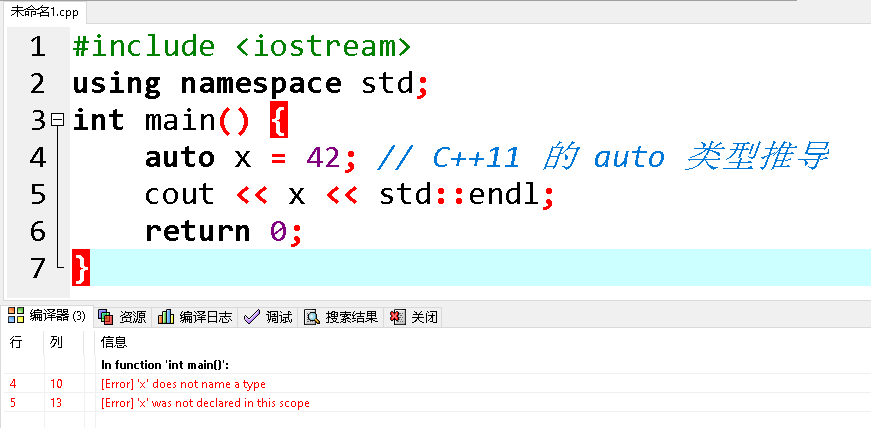
如果要开启C++11的支持,点击“工具”中的“编译选项”

首先勾选”编译时加入以下命令“
在下面的框中输入
-std=c++11
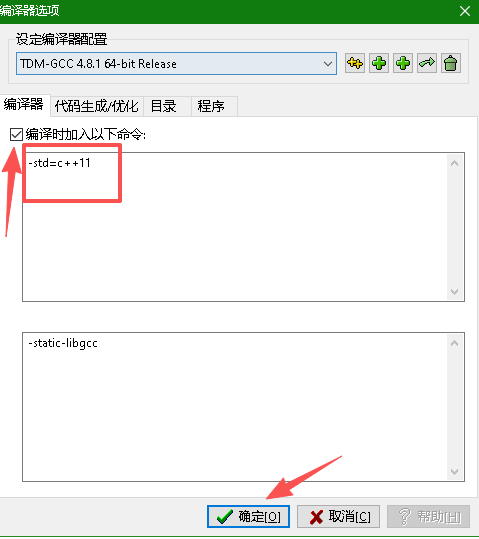
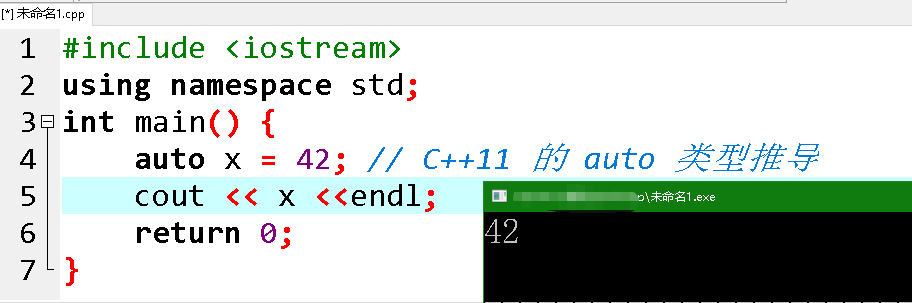
然后点击确定,重新编译运行,可以看到支持C++11了
.jztagtree{max-height:85vh;right:0px}.jzDown{top:10vh}.jztagtree li a{background-color:#448EF6}.jztagtree li a:before{border-right:10px solid #448EF6}.jztagtree li a:hover{background:#0045a6}.jztagtree li a:hover::before{border-right:10px solid #0045a6}
$("#jztoc").toc({content: ".single", headings: "h1,h2,h3"});